
Status
Status is the landing screen. It shows one card per operation, so you see at a glance that the integration is working.
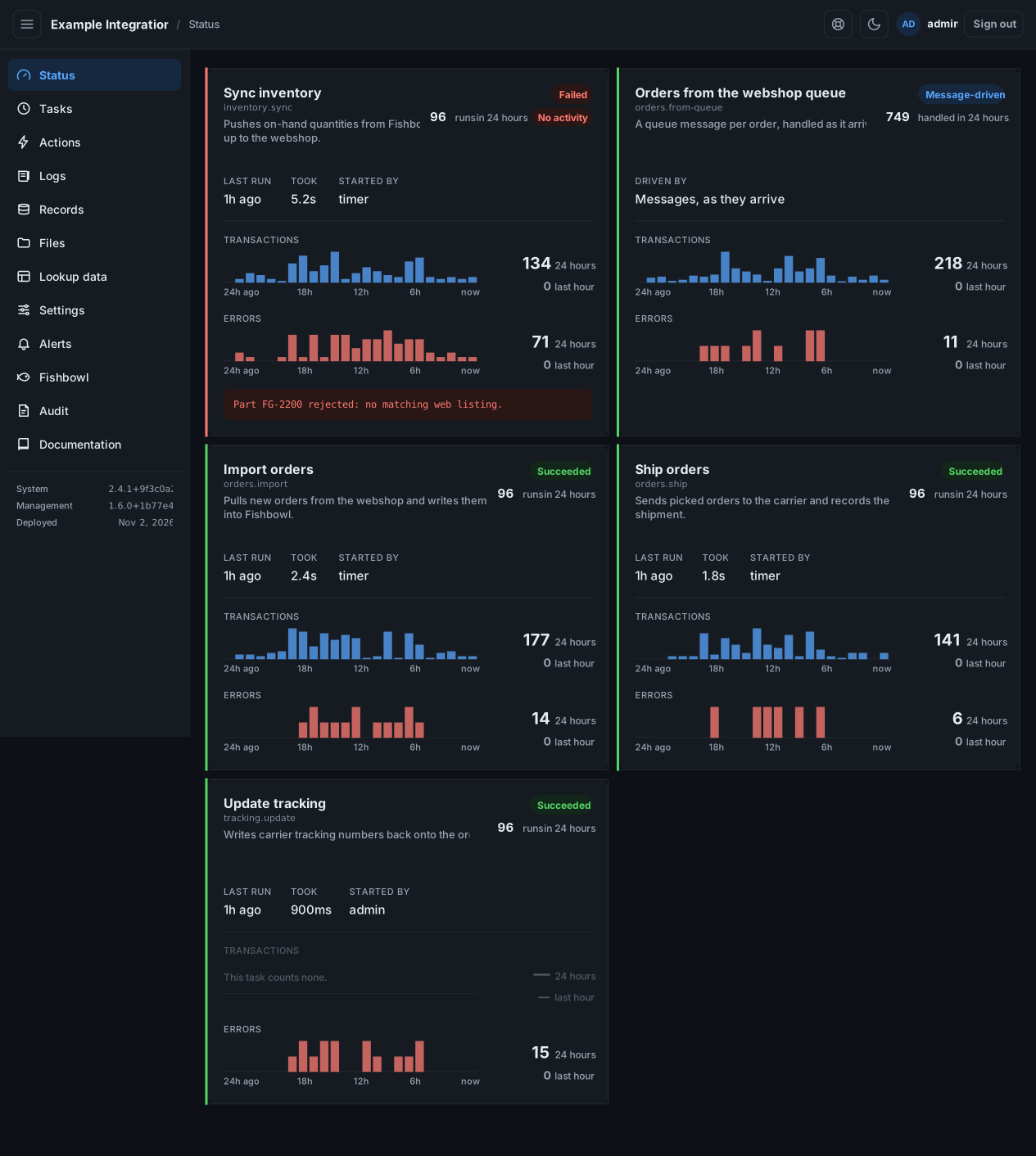
Read a card
Section titled “Read a card”Each card shows:
- The operation’s name and what it does.
- A badge: Succeeded, Failed, Running, Skipped, or Not yet run. A Message-driven operation handles messages as they arrive instead of running on a schedule.
- Last run, how long it took, and who started it.
- Two 24-hour charts: Transactions (the work it did) and Errors. Each shows the last 24 hours and the last hour.
A failed run shows its error under the card. A card marked No activity has not succeeded when it should have. Start there.
Jump to the log
Section titled “Jump to the log”Select a bar in a chart to open Logs for that operation and hour. A bar in the Errors chart opens the log filtered to errors.
If it says it writes no log
Section titled “If it says it writes no log”A banner reading “records runs but writes no log file” means the integration is running but its log is not being kept. The cards still work; the day’s log on the Logs screen will be empty. Request support.
The page refreshes on its own every few seconds.