
Grants
The Grants panel sets what each Fishbowl user is allowed to approve when they connect an AI client by OAuth sign-in (ChatGPT, Claude, Claude Code via claude.ai). A user’s grant is the ceiling: when they sign in, they can approve those scopes and no more.
This is the OAuth counterpart to a minted token’s scopes. A token carries the scopes you choose when you mint it; an OAuth client carries the scopes the user has been granted here. See Connect for the two methods and the full scope catalogue.
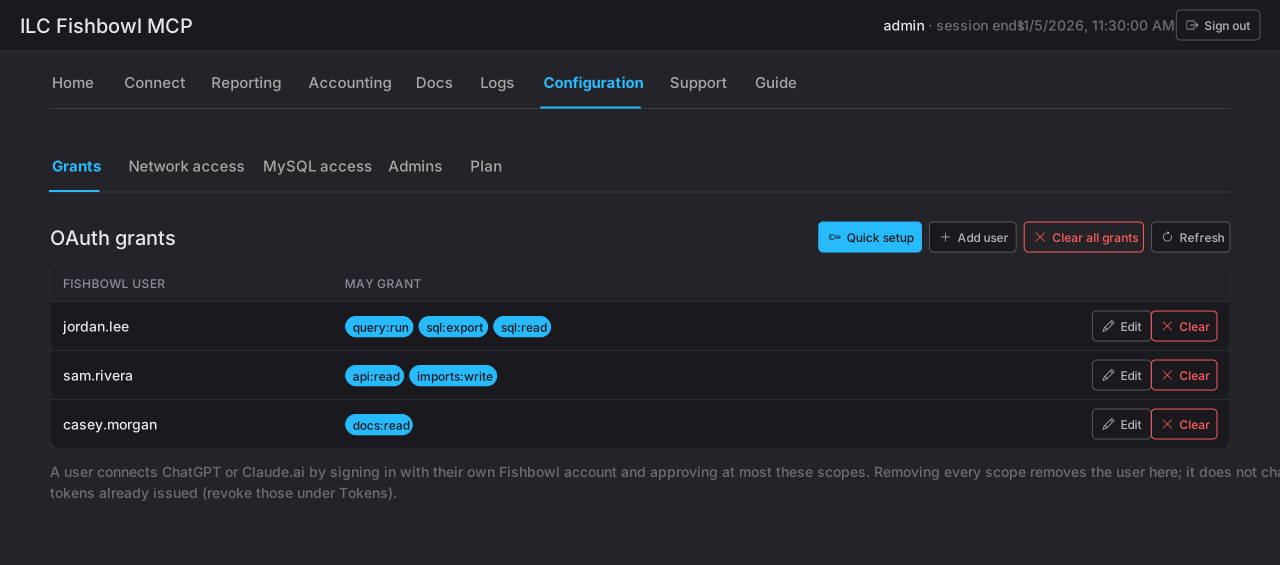
The list
Section titled “The list”The list is deliberately sparse. Fishbowl’s admin user is always present; every other user appears only after an administrator adds them. A user who isn’t listed has no grants, and cannot connect an AI client through OAuth at all.
- Add user opens a dialog to pick a Fishbowl user and choose their scopes.
- Edit changes an existing user’s scopes.
- Scopes are grouped by topic, with Add all / Remove all shortcuts.
With nothing selected for a user, they can’t connect by OAuth — selecting scopes is what lets them connect at all.
Quick setup
Section titled “Quick setup”The quick setup path grants a starter read-only set — sql:read and
docs:read — to one Fishbowl user, so you can connect an AI client and demo ILC
MCP in a minute. You pick the user; it takes you straight to
Connect.
Grants vs. Fishbowl rights
Section titled “Grants vs. Fishbowl rights”A grant decides which scopes a user may approve. It never adds a Fishbowl
right the user doesn’t already have — a user granted imports:write can still
only run the import types their own Fishbowl group allows. Grants widen or narrow
what ILC MCP exposes; Fishbowl’s own permissions still apply underneath.