
MySQL access
The MySQL access panel is the database-side security boundary for everything ILC MCP reads. It controls three things, in layers:
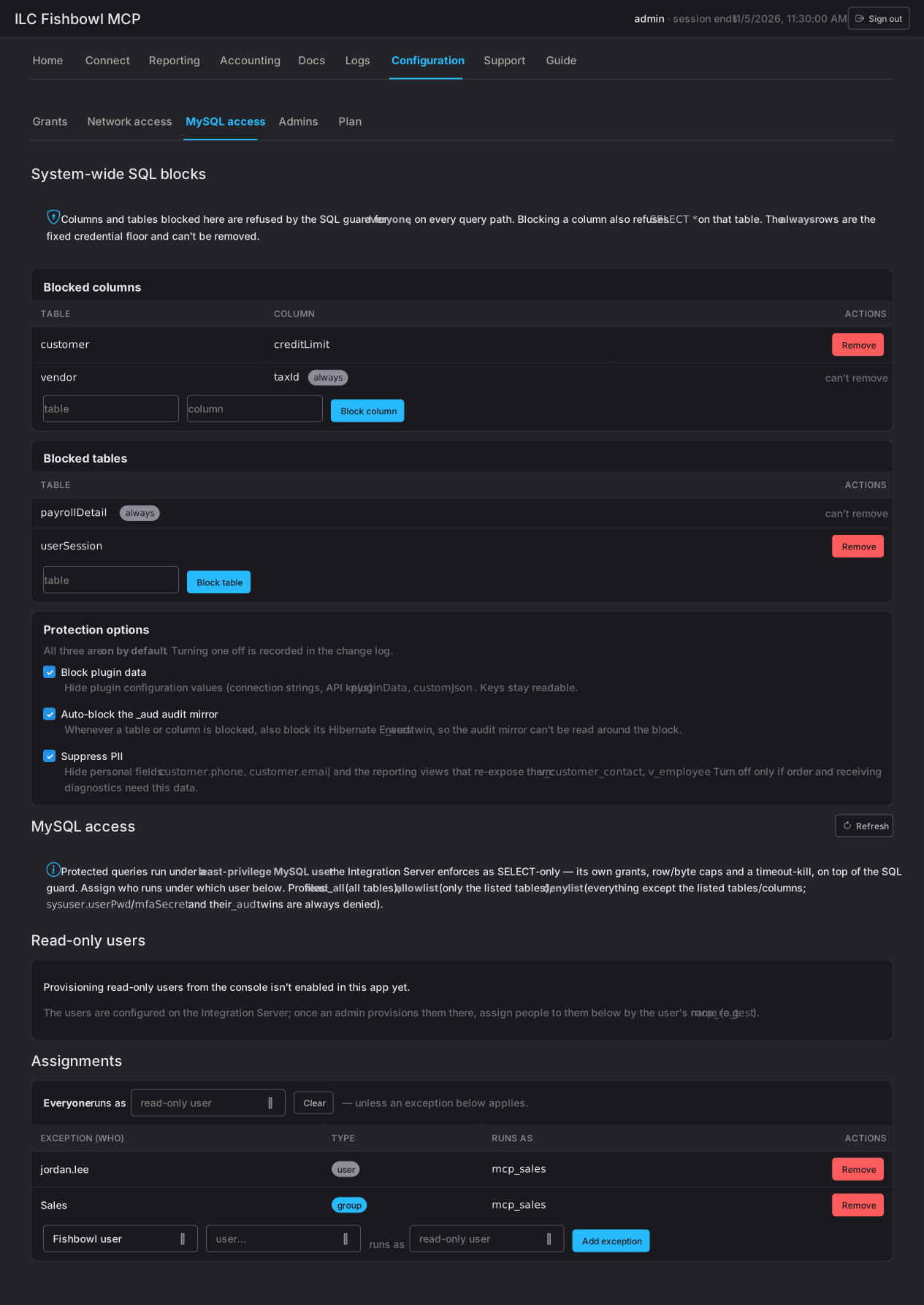
- System-wide SQL blocks — columns and tables the SQL guard refuses for everyone.
- Read-only users — the least-privilege database accounts reads actually run under.
- Assignments — which read-only user each person’s queries use.
Reads are the one place an AI client touches your database directly, so this panel is defence in depth: even a query that passes every earlier check runs as a stripped-down database user that physically cannot do more than read.
How a read reaches the database
Section titled “How a read reaches the database”Every read passes three gates before it returns a row. This panel owns the last two:
- Scope. The connection must hold
sql:read(see Connect). - The SQL guard. The statement must be a single
SELECT, and it must not touch anything on the block list below. - A least-privilege MySQL user. The query runs as a read-only database account the Integration Server enforces as SELECT-only — with its own grants, row and byte caps, and a timeout-kill — on top of the guard.
A query has to clear all three. The block list stops what can be asked; the read-only user caps what the database will do even if something slips past.
System-wide SQL blocks
Section titled “System-wide SQL blocks”The System-wide SQL blocks card lists columns and tables that the SQL guard refuses for everyone, on every query path — reads, saved queries, reporting, all of it.
- Blocked columns — refused by
table.column. Blocking a column also refusesSELECT *on that table, so nothing leaks a blocked column by wildcard. - Blocked tables — refused whole.
Some rows are marked always: these are the fixed credential floor and can’t be removed. You add your own blocks with the table/column inputs, and remove any block that isn’t fixed.
Protection options
Section titled “Protection options”Three switches sit under the blocks. All three are on by default, and turning one off is recorded in the change log:
| Option | What it does |
|---|---|
| Block plugin data | Hides plugin configuration values — connection strings, API keys. The plugin keys stay readable; only the secret values are hidden. |
Auto-block the _aud audit mirror |
Whenever you block a table or column, also blocks its Hibernate Envers _aud twin — so the audit mirror can’t be read around the block. |
| Suppress PII | Hides personal fields, and the reporting views that re-expose them. |
Read-only users
Section titled “Read-only users”A read-only user is a least-privilege MySQL account that reads run under. Each has a profile that fixes which tables it can even see:
| Profile | Sees |
|---|---|
| read_all | Every table. |
| allowlist | Only the tables you list. |
| denylist | Everything except the tables and columns you list. |
On a denylist, sysuser.userPwd and mfaSecret — and their _aud twins — are
always denied, regardless of what you list. That floor can’t be opened.
Creating a read-only user asks for a Name (a logical handle), a MySQL
user (letters, digits, _ or $; up to 32 characters), the profile, and —
for allowlist or denylist — the tables or columns, one per line. Saving
provisions the account on the Integration Server node; removing one drops
its MySQL user and grants.
Assignments
Section titled “Assignments”Assignments decide which read-only user a given person’s queries run as.
- Everyone runs as — the app default, applied to anyone without an exception.
- Exceptions — a specific read-only user for one Fishbowl user or one Fishbowl group. An exception overrides the default.
This is how you give most people a broad read-only account while pinning sensitive roles to a tighter one — or the reverse. Someone with no exception always falls back to the default.
Putting it together
Section titled “Putting it together”A typical secure setup:
- Keep all three protection options on.
- Add any blocks specific to your tenant (a custom field holding personal data, a table a plugin stuffs secrets into).
- Provision a
read_allread-only user as the default, and a tighter allowlist user for roles that should only see, say, inventory and orders. - Pin those roles with an exception.
Every layer is independent: a block protects a column even for someone on
read_all, and a read-only user’s SELECT-only grant holds even for a query the
guard allowed.