
Connect
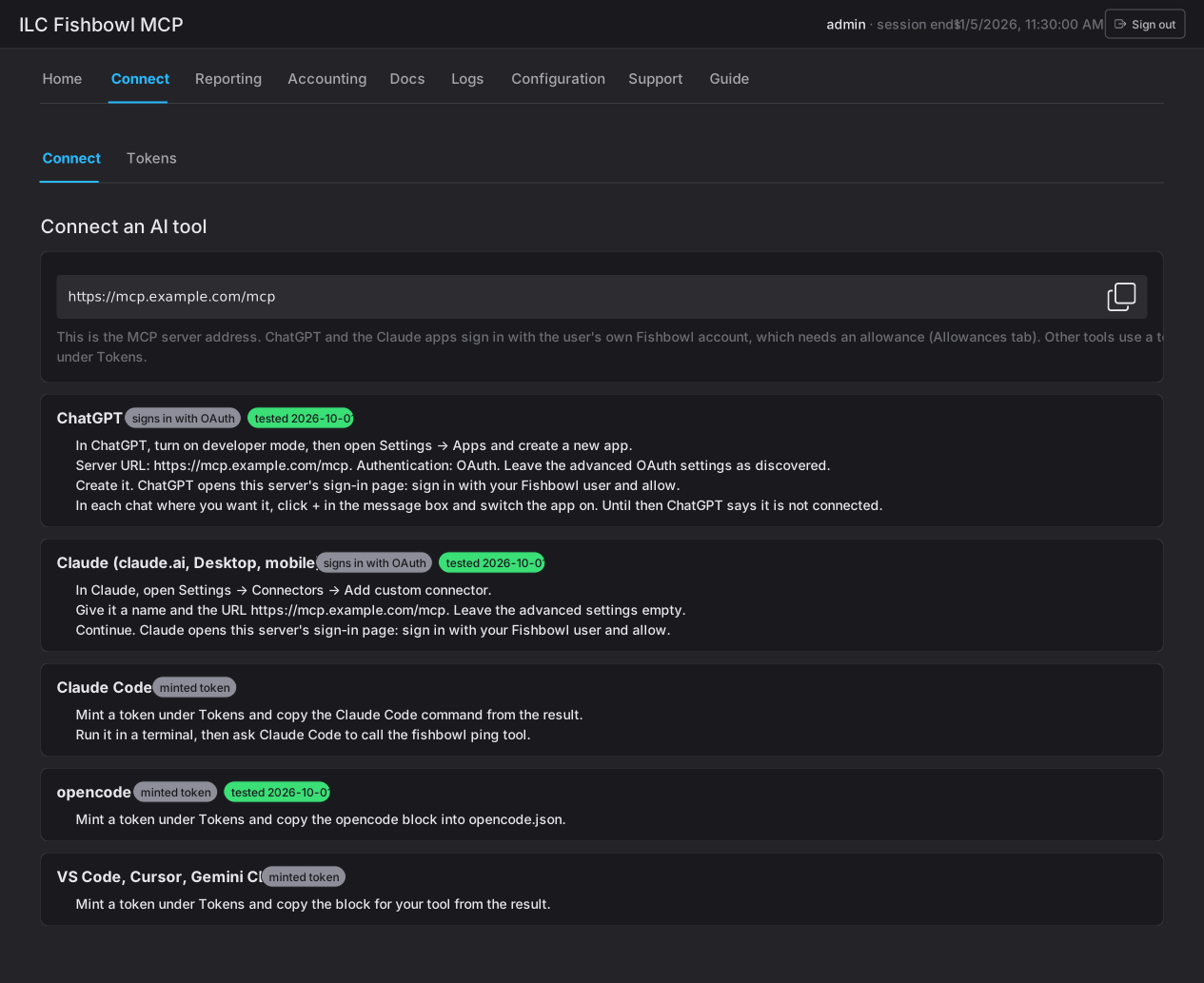
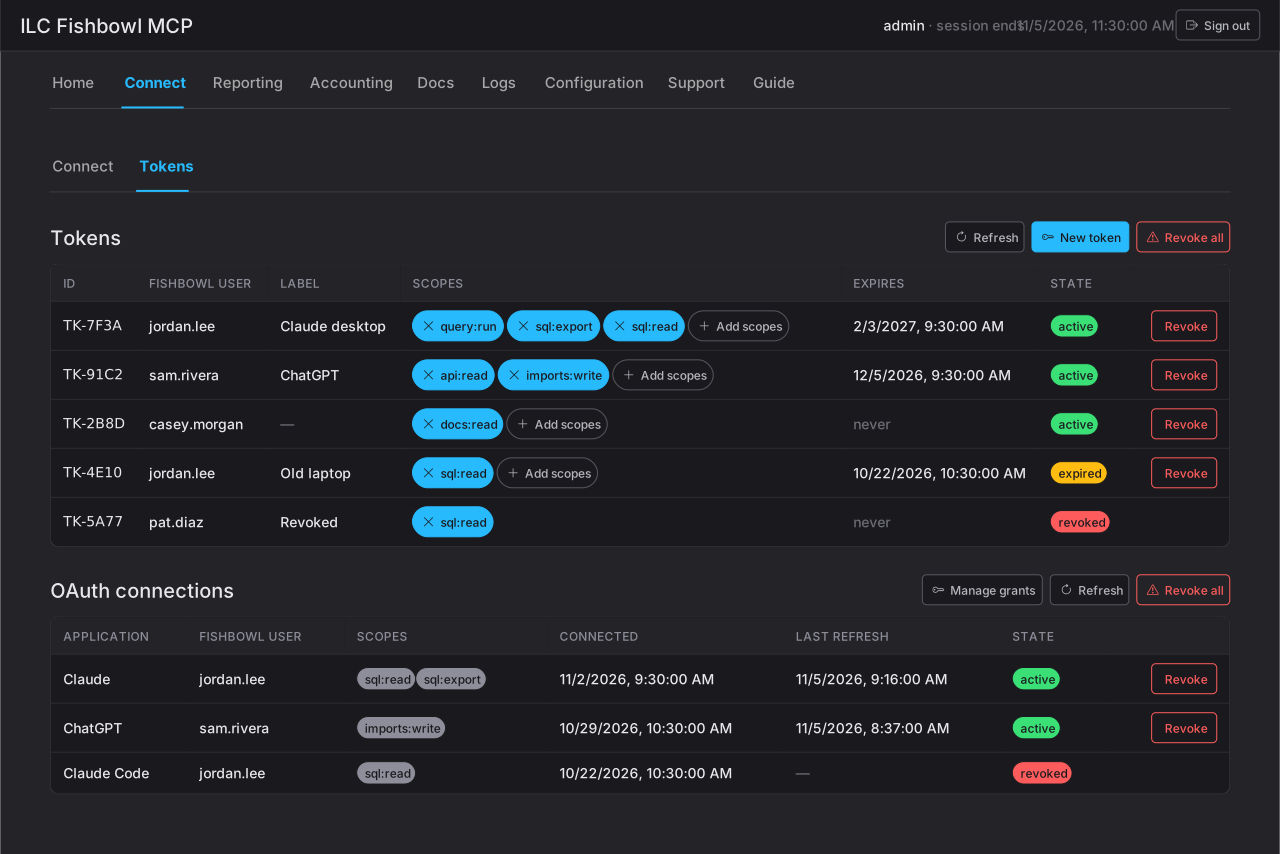
The Connect tab is where you give an AI client access to Fishbowl and where you review and revoke that access later. It has two sub-tabs: Connect, which shows the server address and the per-client setup steps, and Tokens, where you mint and manage tokens and see the OAuth connections people have made.
Every connection acts as one Fishbowl user, and can do only what that user’s Fishbowl rights and the connection’s scopes allow. Nothing here grants a Fishbowl right the user doesn’t already have.
Two ways to connect
Section titled “Two ways to connect”Which method a client uses depends on the client, not on your preference:
| Method | Clients | Who sets it up |
|---|---|---|
| OAuth sign-in | ChatGPT, Claude (claude.ai, Desktop, mobile), Claude Code | The user signs in with their own Fishbowl account and approves the scopes you granted them. |
| Minted token | Claude Code, opencode, VS Code, Cursor, Gemini CLI | You mint a token for a Fishbowl user, choose its scopes, and hand the user the setup snippet. |
The difference that matters: an OAuth client authenticates as the person at their keyboard, so you decide ahead of time what that person may do (their grants). A token authenticates as whoever holds it, so you choose its scopes when you mint it and hand it over once.
Claude Code can use either method: a minted token, or OAuth when it’s connected through claude.ai. The Connect sub-tab shows the token steps; a user who signs in to Claude Code through claude.ai connects by OAuth, like the Claude apps, and appears under OAuth connections.
The server URL
Section titled “The server URL”The Connect sub-tab shows the MCP server address with a copy button. This is the one piece of information every client needs, whichever method it uses. Give it to the user along with the steps for their client — the Connect sub-tab lists those steps per client (ChatGPT, Claude, Claude Code, opencode, and VS Code / Cursor / Gemini CLI).
Connecting an OAuth client (ChatGPT, Claude)
Section titled “Connecting an OAuth client (ChatGPT, Claude)”An OAuth client signs in as the user themselves. Because of that, the user can only approve scopes you have granted them first:
- Set the user’s grants. Under Configuration ▸ Grants, add the Fishbowl user and choose which scopes they may approve. With nothing granted, the user cannot connect an OAuth client at all.
- Share the server URL and the steps for their client from the Connect sub-tab.
- The user connects. They add the custom connector in their AI client, which opens this server’s sign-in page; they sign in with their Fishbowl account and allow.
- Confirm it. The connection appears under OAuth connections (on the Tokens sub-tab) with the scopes it holds and its state.
A user’s grants are the ceiling for every OAuth client they connect — raising or lowering a grant changes what they can approve next time, and revoking the connection forces a fresh sign-in.
Minting a token (Claude Code and other tools)
Section titled “Minting a token (Claude Code and other tools)”A token lets one tool act as one Fishbowl user. You mint it; the user pastes it into their tool once.
Click New token on the Tokens sub-tab and fill in:
- Fishbowl user — the user the token acts as. Its actions are that user’s actions, bounded by that user’s Fishbowl rights.
- Scopes — what the token may do, grouped by topic (see Scopes).
With no scopes a token can only call
ping. - Expires — 30, 90, 365 days, or never. Default is 90.
- Label — a note to recognise it later, e.g. Claude on Maria’s laptop.
You can change a token’s scopes any time from the Tokens table — each scope is a chip you add or remove, and it takes effect on the token’s next call. Expiry is fixed at mint time; to extend it, mint a new token and revoke the old one.
Scopes
Section titled “Scopes”Scopes are the same catalogue whether you grant them to an OAuth user or mint them into a token. Read scopes change nothing; write scopes are still bounded by the user’s own Fishbowl rights and the connector’s approval step.
The read-only tier is sql:read + docs:read; the read-write tier adds
the write scopes. The full list, with what each scope grants, is in
Reference ▸ Access scopes.
Reviewing and revoking
Section titled “Reviewing and revoking”Both lists live on the Tokens sub-tab.
OAuth connections — one row per client a user connected (ChatGPT, Claude.ai), showing the application, the Fishbowl user, its scopes (or ping only), when it connected, its last token refresh, and its state. Revoke ends it; the user must sign in again to reconnect. Manage grants jumps to Configuration ▸ Grants.
Tokens — one row per minted token, showing its id, Fishbowl user, label, scopes, expiry, and state (active, expired, or revoked). Revoke stops it at its next call.
Client quick reference
Section titled “Client quick reference”| Client | Method |
|---|---|
| ChatGPT | OAuth sign-in |
| Claude (claude.ai, Desktop, mobile) | OAuth sign-in |
| Claude Code | Minted token, or OAuth via claude.ai |
| opencode | Minted token |
| VS Code, Cursor, Gemini CLI | Minted token |
The operator’s side of connecting — the exact steps in each client — is in the User guide under Connecting.