Owners · asked in Claude

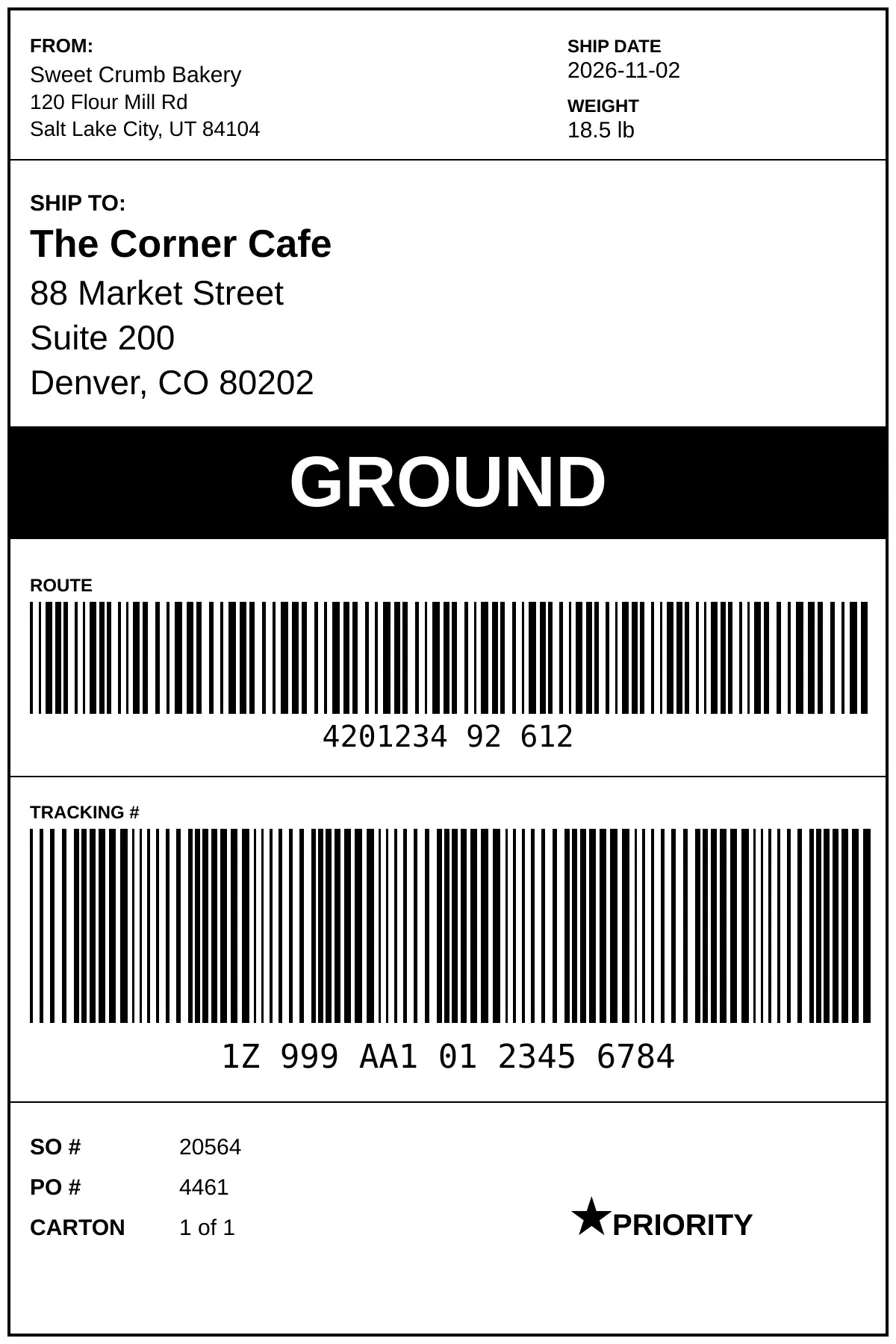
“here's the shipping label we want - can you build this as a printable 4x6 label in Fishbowl?”

Shipping Label 4x6 is installed in Fishbowl under Company › Labels and shows up in the Shipping module's print menu.
Fishbowl MCP connectedin Claude
Attached reference imagehere's the shipping label we want - can you build this as a printable 4x6 label in Fishbowl?
✓Drafted · previewed · installed on your approval

Shipping Label 4x6 is installed in Fishbowl under Company › Labels and shows up in the Shipping module's print menu. It prints one 4x6 page per carton of the selected shipment. For now only admins can see it; an admin needs to grant your user groups access.

Where each field comes from

LabelFishbowl source
FROMDefault company name and its Main Office address
SHIP DATEDate the shipment shipped, or today if it hasn't shipped yet
WEIGHTThe carton's freight weight and unit (defaults to lb)
SHIP TOThe shipment's ship-to name, address (multi-line), city, state and ZIP
Black barCarrier service name (e.g. GROUND); falls back to the carrier name
ROUTE420 + ship-to ZIP as a Code 128 barcode, e.g. 42080202
TRACKING #The carton's tracking number as a Code 128 barcode; shows "(no tracking number)" if blank
SO # / PO #SO number and customer PO
CARTON"1 of 3" style, per carton
PRIORITYBlack tag, shown only when the SO priority is 1-Highest or 2-High

Things to check on your first test print

  • Addresses aren't verified yet. My data access blocks reading ship-to and address fields, so I tested every other field against shipment S20564 but couldn't check those. Print one real shipment and confirm the FROM and SHIP TO blocks look right.
  • The star became a black tag. Fishbowl's report font may not have a ★ character, so I used a black "PRIORITY" box instead.
  • Set the label size on the printer. In the thermal printer's driver, set the media to 4×6 in. The report is laid out at exactly that size with ⅛" margins.

To change the layout or what any field shows, ask me to edit report 212.
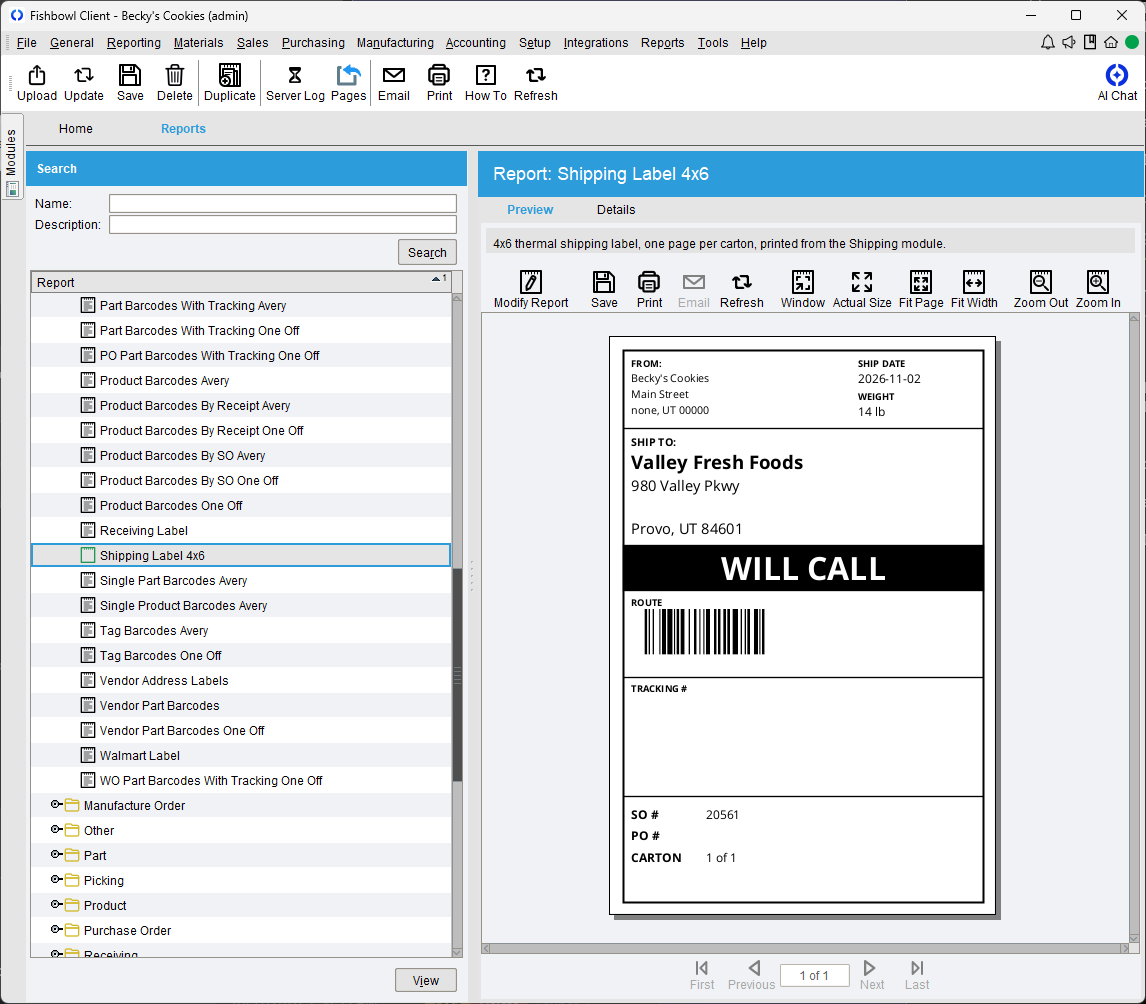
Rendered in Fishbowl

The installed report previewing a real shipment — Becky's Cookies → Valley Fresh Foods. The tracking block is blank because that shipment has no tracking number yet.

A real 340-second session on our demo Fishbowl, replayed faster.

Behind the scenes

What your admin sees in the query log for this conversation.

1installed on your approval
✓previewed first
6read-only checks
✓who/what/when logged

Every step the AI took

  1. 1
    Read Fishbowl notes · JASPERREPORTS.md
  2. 2
    Read the Fishbowl notes index
    64 topic notes
  3. 3
    Read Fishbowl notes · SHIPPING.md
  4. 4
    Read Fishbowl notes · REPORTING.md
  5. 5
    See the data behind the sample shipping label (SO 20564) to map label fields to Fishbowl columns
    ✓ passed read-only checkrow cap applied
    Show the SQL
    ? rows · ? ms
  6. 6
    Check non-address shipment data for the sample SO (carrier, carton, tracking, weight, PO, priority)
    ✓ passed read-only checkrow cap applied
    Show the SQL
    SELECT so.id AS soId, so.num AS soNum, so.customerPO, so.priorityId, s.id AS shipId, s.num AS shipNum, s.statusId, c.name AS carrier, cs.name AS service, s.cartonCount, CAST(s.dateShipped as CHAR) AS dateShipped, CAST(s.dateCreated as CHAR) AS shipCreated, sc.cartonNum, sc.trackingNum, sc.freightWeight, sc.weightUOM
    FROM so
    LEFT JOIN ship AS s ON s.soId = so.id AND s.orderTypeId = 20
    LEFT JOIN shipcarton AS sc ON sc.shipId = s.id
    LEFT JOIN carrier AS c ON c.id = s.carrierId
    LEFT JOIN carrierservice AS cs ON cs.id = s.carrierServiceId
    WHERE so.num = @soNum
    LIMIT 101
    1 row · 192 ms
  7. 7
    Looked up a table · ship
    30 columns
  8. 8
    Looked up a table · so
    66 columns
  9. 9
    Find stock shipping/label reports to learn the parameter Fishbowl passes from the Shipping module
    ✓ passed read-only checkrow cap applied
    Show the SQL
    SELECT r.id, r.name, r.path, m.name AS module
    FROM report AS r
    JOIN reporttomodule AS rm ON rm.reportId = r.id
    JOIN module AS m ON m.id = rm.moduleId
    WHERE m.name IN ('Shipping', 'Ship') OR r.name LIKE '%Label%'
    ORDER BY m.name, r.name
    LIMIT 101
    8 rows · 342 ms
  10. 10
    Opened it in the Jasper editor
  11. 11
    Learn SO priority codes to decide when the label shows the PRIORITY star
    ✓ passed read-only checkrow cap applied
    Show the SQL
    SELECT id, name
    FROM priority
    ORDER BY id
    LIMIT 101
    5 rows · 208 ms
  12. 12
    Looked up a table · company
  13. 13
    Looked up a table · shipcarton
    19 columns
  14. 14
    Looked up a table · company
    13 columns
  15. 15
    Looked up a table · address
    13 columns
  16. 16
    Find the address type for the company's main office (label FROM block)
    ✓ passed read-only checkrow cap applied
    Show the SQL
    SELECT id, name
    FROM addresstype
    ORDER BY id
    LIMIT 101
    5 rows · 213 ms
  17. 17
    Looked up a table · state
  18. 18
    Test the label report query (non-address fields) for shipment S20564
    ✓ passed read-only checkrow cap applied
    Show the SQL
    SELECT co.name AS FROMNAME, COALESCE(s.dateShipped, NOW()) AS SHIPDATE, sc.freightWeight AS WEIGHT, COALESCE(NULLIF(sc.weightUOM, ''), 'lb') AS WEIGHTUOM, UPPER(COALESCE(cs.name, car.name)) AS SERVICE, sc.trackingNum AS TRACKINGNUM, so.num AS SONUM, so.customerPO AS PONUM, CONCAT(sc.cartonNum, ' of ', (SELECT COUNT(*)
    FROM shipcarton AS x
    WHERE x.shipId = s.id)) AS CARTONLABEL, so.priorityId AS PRIORITYID
    FROM ship AS s
    JOIN shipcarton AS sc ON sc.shipId = s.id
    LEFT JOIN so ON so.id = s.soId AND s.orderTypeId = 20
    LEFT JOIN carrier AS car ON car.id = s.carrierId
    LEFT JOIN carrierservice AS cs ON cs.id = s.carrierServiceId
    LEFT JOIN company AS co ON co.defaultFlag = 1
    WHERE s.id = @shipId
    ORDER BY sc.cartonNum
    LIMIT 101
    1 row · 224 ms
  19. 19
    Drafted the report layout
    jasper draft (v1)
  20. 20
    Adjusted the layout
  21. 21
    Compiled the report
    compiled — Jasper has no live preview
  22. 22
    Looked up the report folders
    29 report folders
  23. 23
    Asked you to confirm the design
    Folder: Which Reports folder should the 4x6 label go in?
    ✓ You chose: Company > Labels (Recommended)
    Modules: Which modules should it print from? It's keyed to a shipment, so it only works from Shipping as built.
    ✓ You chose: Shipping only (Recommended)
    Route code: What should the ROUTE barcode encode? Your mockup's value looks like a placeholder.
    ✓ You chose: 420 + ship-to ZIP (Recommended)
    3 questions
  24. 24
    Installed the report
    installed as report 212

Reads are checked and row-capped. Every change was shown to you as a preview and written only after you confirmed — under your own Fishbowl login, limited to what you can do. The request, the preview, and the committed action are all logged for your admins.

Ask this about your own Fishbowl

We'll set up ILC MCP on your Fishbowl and build the queries your team needs.