
2D scanner readiness for the warehouse, not just the register
Almost everything written about Sunrise 2027 is about retail checkout. But the same 2D symbols are going to show up on inbound cartons, supplier labels, and product packaging in your warehouse, and nobody is sending your receiving dock a press release about it. If your warehouse guns can’t read 2D barcodes, you’ll find out the day a supplier switches labels.
The good news: auditing your fleet takes an afternoon. The bad news: if the audit fails, the fix is hardware, and hardware has lead times.
The one fact that decides everything
A laser scanner physically cannot read a matrix barcode like a QR code or GS1 DataMatrix. Not “reads it slowly,” not “needs a firmware update” — cannot. A laser reads a single horizontal line of light bounced off bars and spaces; some laser models manage stacked codes like PDF417 by sweeping that line, but a matrix symbol encodes data in two dimensions at once, and there is no line to sweep. Reading 2D symbols requires a camera-based imager that photographs the whole symbol and decodes it.
Point a laser gun at a QR code and you get nothing: no beep, no error, no partial read. To the operator it looks like a dead label. So the question of warehouse 2D readiness comes down to which of your scanners are lasers, and which are imagers.
Auditing your fleet
Three steps, in order of increasing effort.
1. Inventory the hardware. Pull the model number off every scanner in the building — the guns, the ones bolted to forklifts, the ones that only come out during physical inventory. The odds are in your favor: most handheld scanners sold in the past decade are 2D imagers, and across the Fishbowl customers we work with, most fleets are already 2D-capable. The units that fail this check are usually legacy laser guns from the Symbol/Motorola and Intermec era. Don’t guess from age or brand; the spec sheet will say “1D laser” or “2D imager,” and if it says laser, that unit is done the day 2D labels arrive. If you’re replacing units, Zebra’s DS-series imagers are the workhorse answer — new, used, or refurbished; we’ll cover what to buy (and what the budget imports can’t do) in a separate post.
2. Check what your software does with a 2D payload. This is the step people skip, and it’s where the quiet failures live. A 1D UPC scan emits a short digit string. A 2D GS1 symbol emits a longer string that can carry GTIN, lot, expiration, and serial — delimited with GS1 application identifiers and, in some symbologies, non-printing separator characters — and how those separators come through differs by scanner and input mode. If your scanning workflow expects a 12-digit UPC in a part-number field, a 2D scan doesn’t fail cleanly — it dumps a long string with embedded structure into a field that was never designed for it. Whether Fishbowl’s scanning screens, or your custom scanning app, tolerate that payload is something to test on your own setup, not assume.
3. Test with a real GS1 symbol. Not a plain QR code of the part number you generated on a free website — that tests the camera, not the workflow. Encode a real GS1 element string (GTIN plus a lot and expiry) into a GS1 DataMatrix, print it at the size it will actually appear on a carton, and run it through receiving. The camera reading the symbol is the easy half. The string arriving intact in the right fields is the half that breaks. Here’s one to start with:
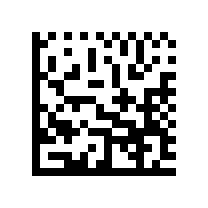
A real GS1 DataMatrix (GTIN + expiry + lot). Point your gun at it: a laser gives you nothing, an imager gives you the full payload.
What to watch for
Scan distance and label quality matter more with imagers than people expect. A laser gun reads a wide 1D barcode across a forklift aisle; an imager reading a small DataMatrix wants to be closer, and glare off a poly bag or shrink wrap can blind a camera in a way it never bothered a laser. If your workflows depend on long-range scanning — location labels up on racking — check the imager’s rated range for the symbol size before you buy.
This also doesn’t have to be a dedicated-hardware question at all. Every Android phone made in the last several years has a camera that reads 2D symbols fine, and we build custom scanning workflows (our beep1 line) that run on ordinary Android devices. For operations that were already dreading a hardware refresh, a phone or a rugged Android device with a scanning app is a legitimate path — the decision is workflow fit, not optics.
If you do one thing this quarter: walk the floor, write down every scanner model, and sort the list into laser and imager. If any are lasers, you can plan the replacement now instead of scrambling when a supplier changes their labels.
Related: