
Adventures in Accounting: The Two Entries a Fishbowl Credit Return Posts to QuickBooks
Here’s a support question we get often enough that it’s worth writing down. Someone returns goods to a vendor in Fishbowl, then searches for that PO number in QuickBooks Online and finds two transactions instead of one:
- a Vendor Credit for the full return amount, and
- a Journal Entry for $0.00 with a description like “FB: Accounting adjustments for PO#4021.”
The Vendor Credit makes sense. The $0.00 journal is the one that raises eyebrows — why did Fishbowl post an entry for nothing, and should I be worried about it?
Short answer: it isn’t nothing, it’s exactly right, and once you see the mechanics you’ll never wonder about it again.
The setup
A Fishbowl purchase order for a credit return looks like a normal PO with negative quantities and costs — it’s the vendor sending you money back, not the other way around. In our example, 2 units go back to the vendor at $250.00 each, for a credit of $500.00.
When Fishbowl exports that to QuickBooks Online, the first thing it creates is a Vendor Credit for the full amount:
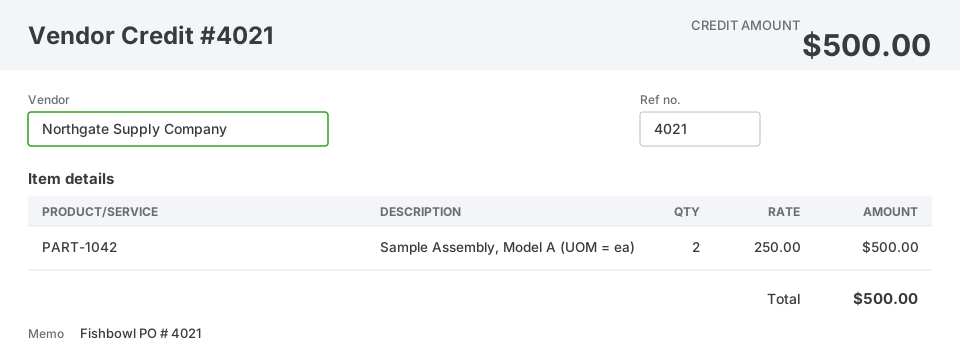
So far, so obvious. The vendor owes you $500.00. That amount ties to the Fishbowl PO to the penny.
The entry that confuses everyone
Right next to it, Fishbowl posts a second transaction — a journal entry whose debits and credits are equal, so the total is $0.00:
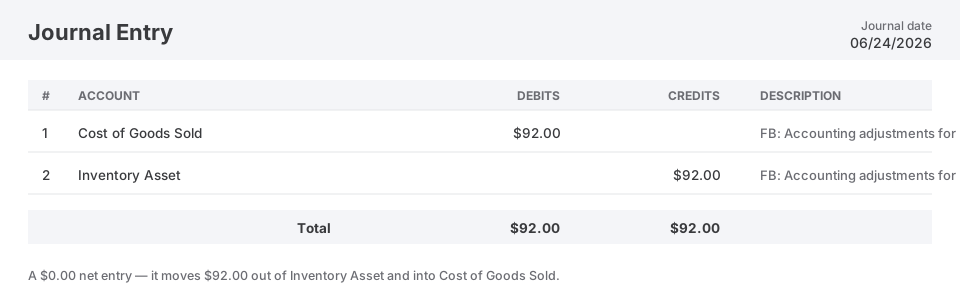
One line debits Cost of Goods Sold and the other credits Inventory Asset, both for $92.00. Because the two lines cancel, the net of this entry is zero — no new money enters or leaves. All it does is move $92.00 from one account to another.
The question is: why does that move need to happen at all?
Return price vs. carried cost
Here’s the key, and it holds no matter which costing method you run — average, FIFO, LIFO, or standard. The price you negotiated to return the units is not the same as what those units were carrying in inventory.
- You’re getting $250.00 each back from the vendor.
- But on the books, each unit was valued at its carried cost — whatever Fishbowl had for that part (the moving average, the specific FIFO layer, the standard cost) — say $296.00 each.
When you pull those 2 units out of stock, inventory has to draw down at the rate your costing method prescribes — their full book value, $592.00 — not by the price the vendor happened to credit you. That’s why the method doesn’t change the outcome: whatever rate you use, the units leave stock at that rate, and any difference from the credit is the variance. But the Vendor Credit only reduced Inventory Asset by $500.00. The $92.00 journal makes up the difference, and the gap has to land somewhere sensible. It lands in Cost of Goods Sold — specifically the part’s configured COGS account, or your default COGS mapping if the part doesn’t set one — as a loss.
Put both entries side by side and the whole thing balances:
| Account | Debit | Credit | What it means |
|---|---|---|---|
| Accounts Payable | $500.00 | The vendor owes you the agreed credit | |
| Inventory Asset | $500.00 | Vendor Credit reduces inventory… | |
| Inventory Asset | $92.00 | …and the journal removes the rest | |
| Cost of Goods Sold | $92.00 | The loss on the return | |
| Totals | $592.00 | $592.00 | Inventory came off at full carried cost |
Read across the three accounts:
- Accounts Payable — debited $500.00. The vendor owes you exactly what they agreed to credit. Correct.
- Inventory Asset — credited $500.00 and $92.00, for a total reduction of $592.00. That’s the true carried cost of the 2 units leaving stock. Correct.
- Cost of Goods Sold — debited $92.00. You returned inventory worth $592.00 and only got $500.00 back for it, so the $92.00 shortfall is a real economic loss and it hits the P&L. Correct.
Everything balances, and every dollar is in the account it belongs in.
So is anything broken? No.
This is the normal, expected shape of a Fishbowl credit return in QuickBooks Online whenever the return price differs from the carried cost. Usually the drift is small enough that nobody notices — but it happens all the time, and every time it does you get this entry. The $0.00 journal isn’t an error, a rounding artifact, or a leftover. It’s Fishbowl doing the accounting correctly:
The vendor credits you at the return price. Inventory has to come off at carried cost. The difference is a gain or loss, and the $0.00 journal is where Fishbowl books it.
If the return price had happened to exactly equal the carried cost, there’d be no gap and no journal — just the Vendor Credit. The moment those two numbers differ, you get the companion entry. And it works both ways: if you’d returned the units for more than they were carrying, the same journal posts in reverse — crediting COGS and debiting Inventory — booking a small gain instead of a loss.
The only thing worth explaining to the business is why $92.00 showed up in Cost of Goods Sold that month: it’s the loss from returning units to the vendor for less than they were worth on the books. Not a mistake — just the truth about the transaction.
The reconciliation takeaway
When you’re tying Fishbowl inventory to your QuickBooks Inventory Asset account, expect credit returns to produce two linked entries, and read them together. In a case like this one there’s no reconciliation problem at all — the two entries net to exactly the right inventory reduction. The only trouble comes if you match the Vendor Credit, see the $0.00 journal, and mistake it for a discrepancy.
So there’s nothing to fix here — just something to understand. If an entry like this turns up in your books and you’re not sure whether it explains a variance you’re chasing, that’s exactly the kind of thing we can walk through with you, the same way we did here.